
LearnWorlds ZOOM Integration
LearnWorlds Zoom integration: Run live sessions inside your LMS
Connect Zoom to LearnWorlds to deliver live classes, webinars, and coaching sessions directly inside your courses. Keep scheduling, attendance tracking, and recordings all in one place without switching platforms or chasing data manually.
TL;DR
With the LearnWorlds LMS Zoom integration, you can schedule and host Zoom Meetings and Webinars as learning activities directly inside your courses. Sessions sync to Zoom automatically, and everything is managed without leaving your school.
Learners join via a Join Link, no Zoom registration required
Attendance is tracked and stored automatically
Each instructor connects their own Zoom account (Learning Center plan and above)
Available from the Pro Trainer plan. A Zoom account is required. Free for Meetings, paid add-on for Webinars.
The Zoom interface displays in English regardless of your school language or Zoom account settings. This is a known limitation affecting multilingual schools and is not configurable.
What syncs between Zoom and LearnWorlds
See exactly what passes between the two systems, and what your team needs to configure.
| Feature | How it works | Type |
|---|---|---|
| Zoom Meeting creation | A Zoom Meeting is created in your Zoom account when you add one as a learning activity in LearnWorlds. | Automatic |
| Zoom Webinar creation | A Zoom Webinar is created when you add one as a learning activity in LearnWorlds. Zoom Webinars require a paid Zoom account and the Webinar add-on (Zoom-side requirement). | Automatic |
| Learner access (Join Link) | Enrolled learners join sessions via a Join Link inside the LearnWorlds course player. They do not register through Zoom’s native registration page, and no Zoom account is required. | Automatic |
| Attendance tracking | LearnWorlds records which learners joined each session and stores this data in your school’s reports. | Automatic |
| Session reminders | Email reminders can be configured for scheduled live sessions to notify enrolled learners before a session starts. | Configured by admin |
| Recording storage | Sessions can be set to record automatically either locally or to Zoom cloud storage, depending on your Zoom plan. Recordings can be made available to learners as a replay inside the course player. | Automatic (once enabled) |
| Course scheduling | Session date, time, duration, and recurrence are set inside LearnWorlds and synced to Zoom. | Configured by admin |
How to set up the LearnWorlds Zoom integration
Ready to connect Zoom to your LMS? Watch the video below or read the step-by-step instructions.
Step 1: Connect your Zoom account
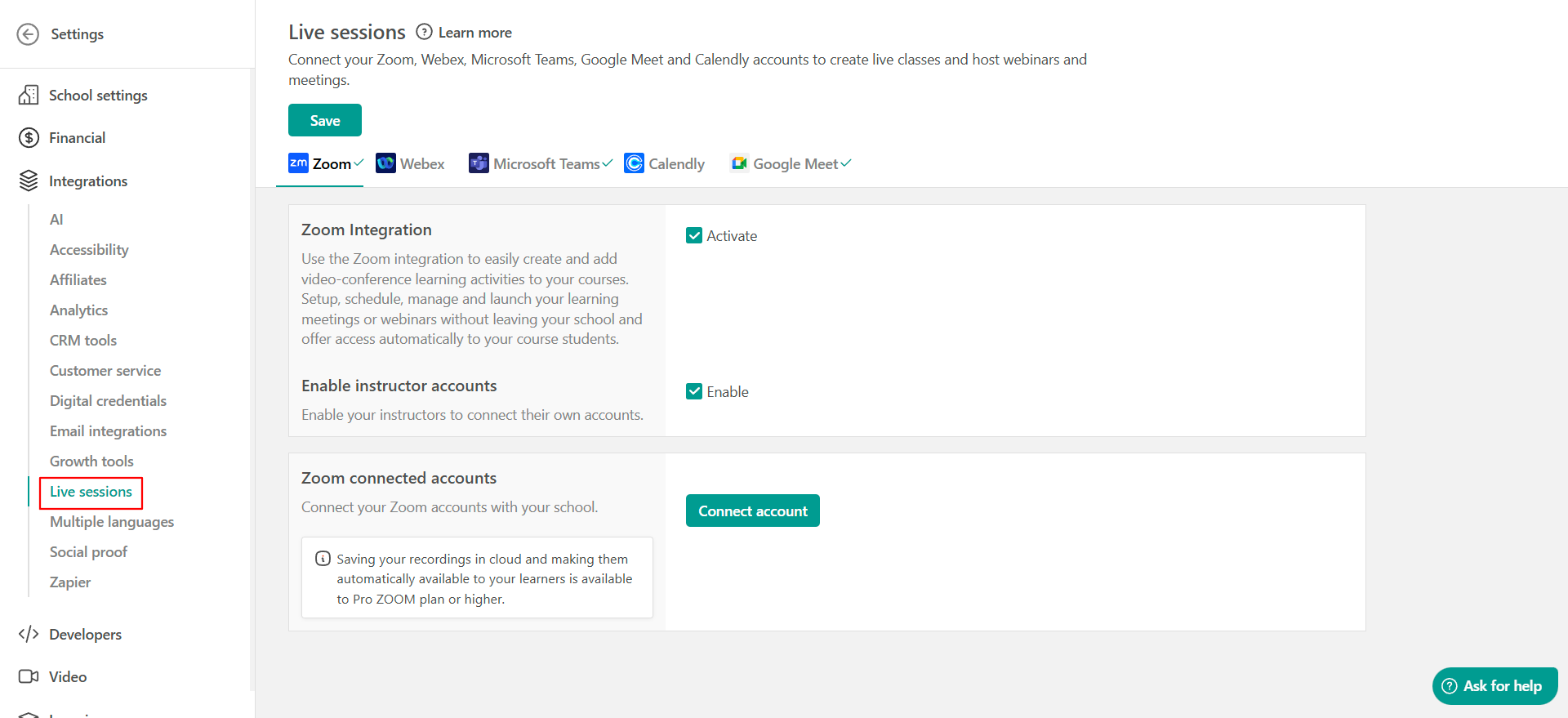
In your LearnWorlds admin, go to Settings → Integrations → Live Sessions and click Activate next to Zoom. Sign in with your Zoom credentials and authorize the connection. This installs the LearnWorlds app in your Zoom account via the Zoom App Marketplace.
Step 2: Add a Zoom session to your course
In your course builder, add a new learning activity and select Zoom Meeting or Zoom Webinar. Fill in the session details. LearnWorlds creates the session in your Zoom account automatically. You can also enable auto-recording and set up email reminders for enrolled learners.
Step 3: Publish and enroll learners
Learners enrolled in the course will see the session in their course player and join via a Join Link. No Zoom account or Zoom registration is required on their end.
Step 4: Monitor sessions and track attendance
Manage upcoming and past sessions from the Live Sessions dashboard in LearnWorlds, part of our virtual classroom software. Attendance is tracked automatically and stored in your school’s reports.
Typical setup time: ~10 minutes
See full setup instructions →
Find LearnWorlds on the Zoom App Marketplace →
The Zoom integration is available from the Pro Trainer plan and above. To connect multiple Zoom accounts (one per instructor) you will need a Learning Center plan or higher. See full pricing details.
| What LearnWorlds handles automatically | What your team configures |
|---|---|
| Creating the Zoom meeting or webinar when a session activity is added | Connecting your Zoom account to LearnWorlds |
| Syncing session details (date, time, duration) to Zoom | Setting up per-instructor Zoom accounts, if needed (Learning Center plan and above) |
| Generating the Join Link for learners inside the course player | Choosing recording type (local or cloud) and enabling auto-recording |
| Tracking and storing attendance data in your reports | Configuring session reminders for enrolled learners |
| Making recordings available to learners as a replay in the course | Specifying replay video source (Zoom Cloud or another URL) |
Note: To disconnect Zoom from LearnWorlds, you need to complete two steps: remove the integration from Settings in LearnWorlds AND deauthorize the LearnWorlds app in the Zoom App Marketplace. Removing it from LearnWorlds settings alone will not fully disconnect the integration.
What you can do with Zoom in LearnWorlds
Run live sessions as part of your course
Add Zoom Meetings and Zoom Webinars directly inside your course builder as learning activities. Learners find their sessions in the same place as the rest of their course content, and join with one click.
Let learners catch up on their own time
Enable auto-recording and sessions are saved automatically either locally or to Zoom cloud storage. Learners can replay the recording directly inside the course player, so a missed session never means missed learning.
Track who showed up without lifting a finger
Attendance is recorded automatically for every Zoom session. No need to cross-reference manually with Zoom reports. The data lives in your LearnWorlds school and feeds into your existing learner progress tracking.
Run LearnWorlds Zoom live sessions for larger audiences
Zoom Webinars support larger audiences and one-to-many delivery. This is useful for any scenario where you need structured broadcast-style sessions inside a course.
Note: Zoom Webinars require a paid Zoom account with the Zoom Webinar add-on.
Use breakout rooms for group work and discussion
Breakout rooms are available during any Zoom Meeting session and are managed directly from the Zoom interface by the instructor. They are not configured from within LearnWorlds.
Give each instructor their own Zoom account
On Learning Center plans and above, each instructor can connect their own Zoom account to LearnWorlds. Sessions they create sync to their account directly, making it straightforward to manage multi-instructor schools without routing everything through a single account.
Who uses the LearnWorlds Zoom integration and how

Cohort-based courses with weekly live sessions
Some courses work best when learners move through the material together. With the LearnWorlds Zoom integration, you can schedule recurring Zoom Meetings as part of a course sequence, one session per week, tied to the relevant module.
Attendance is tracked automatically for each session, so you always know which learners are keeping up and which need a follow-up, without checking Zoom reports separately.

Customer onboarding embedded in the course flow
Instead of running onboarding webinars as standalone Zoom events, you can embed them directly into an onboarding course in LearnWorlds.
New customers move through self-paced content and hit a live Zoom Webinar at the right moment in their journey, fully scheduled, tracked, and recorded within the same course. No separate Zoom event to manage, no manual registration on the learner’s side.

Training companies with multiple instructors
If you run a school where several trainers each deliver their own live sessions, the LearnWorlds Zoom integration scales with you. On Learning Center plans and above, each instructor connects their own Zoom account to LearnWorlds. Using another tool? See the Microsoft Teams LMS integration and the Calendly LMS integration, or browse all LMS integrations.
The sessions they create sync directly to their account, so a training company with ten coaches can run ten simultaneous live programmes without routing everything through one Zoom account or one admin.
How LearnWorlds Zoom integration compares to other LMS platforms
When evaluating an LMS Zoom integration, the questions that matter are how deeply the integration is built in, how much your team needs to configure and maintain, and whether it works the same way for every instructor in your school. The table below compares LearnWorlds against four platforms commonly evaluated alongside it and helps you identify what to look for in a Zoom integration with LMS.
| Feature | LearnWorlds | Docebo | TalentLMS | Thinkific | Kajabi |
|---|---|---|---|---|---|
| Native Zoom integration |  | | | |  |
| Zoom Meetings support | | | | | Manual (via link) |
| Zoom Webinar support | | | | | Manual (via link) |
| Auto-attendance tracking | | | Partial: TalentLMS tracks registration; Zoom tracks attendance | Only if Zoom authentication is enabled | Not available natively |
| Recordings in course player | | Stored in Zoom account, manually uploaded to Docebo | | | Not available natively |
| Per-instructor Zoom accounts | Yes, Learning Center plan and above. One account on Pro Trainer. | | | One Zoom account per Thinkific site. No simultaneous sessions. | |
| Breakout room support | Available during sessions, managed from Zoom interface by instructor | Available during sessions, managed from Zoom interface by instructor | ⚠️ Not confirmed from available sources | | Manual (via link) Zoom breakout rooms available if using Zoom app directly |
| Learner access model | Join Link inside course player, no Zoom account required | Join via course platform, Zoom account may be required depending on settings | Join link shared via platform, no Zoom account required | Join button in course player, no Zoom account required (if authentication disabled) | Manual Zoom link, learners join via Zoom directly |
| Setup complexity | Low: OAuth connection via Zoom App Marketplace; guided setup in admin panel | High: requires IT/admin involvement | Medium: admin-level setup; relatively straightforward | Low: app install from Thinkific App Store | Low: paste Zoom link (but no integration features) |
| Starting price (platform) | Zoom available from Pro Trainer plan (99$/mo) | Enterprise pricing, quote-based, typically $25,000+/year | From ~$139/month (40 users) | Zoom available from Start plan, $99/month | From $179/month. No native Zoom integration. |
Zoom Webinars require a paid Zoom account with the Zoom Webinar add-on across all platforms. This is a Zoom-side requirement, not specific to any LMS.
Competitor data sourced from official documentation and help centers. Features and pricing may change—verify directly with each vendor before making a decision.
Have complex requirements? Book a technical demo.
“I love their customer support, which is top tier. I always receive quick replies, and they always solve my issues. When I first joined LearnWorlds, the platform was very simple to understand and get by. We’ve been going strong and love it!”
“I like that LearnWorlds provides me with a fully functional website where I can offer my students self-study resources and a community chat. The team is responsive and professional, and they really care about what they are doing.”
“I find the AI bot helpful as it gives answers to my questions and even generates pictures for problem-solving. The platform is easy to use, and I love the different ways a course can be customized and has so much interaction.”
“We get email prompts about enrollments, which is a wonderful experience, allowing us to welcome new people with ease. The hands-off experience lets me focus on chemistry, removing the technical hassle of enrolling people.”
“The platform has been easy to set up and navigate. Plus, the onboarding calls have been helpful and tech support is extremely responsive! I am so pleased So far, the tech support has been worth every penny I’ve paid!”
“The platform integrates our website, funnels, marketing, and learning system all in one place, which is super convenient. I also appreciate their regular updates and the support team, which is extremely responsive.”
“I like the sleek, modern, easy to configure aspect of the platform. It is very easy as an admin to to set up pages without using code. I also like the modern features – like lesson markers, ai, and reporting”
“It’s amazing compared to our old learning platform. Every time I think of something I’d love to be able to do, a quick search shows that it’s available, and over a year in, in still finding even more features.”
“The wide range of features, responsive support, and regular platform updates. The value is good for the price, especially considering the range of features, regular updates, and responsive customer support.”
“It’s just amazing to find an all-in-one platform that delivers such high quality, they’ve really raised the bar and I love not having to compromise on the product we deliver because of software limitations.”
“The platform is really configurable, giving us a huge amount of flexibility about how to lay out our course. It’s allowed us to deploy our course in a drip feed format, which is fantastic for our learners.”
“I am using LearnWorlds for long time and it give us interactive video features, quizzes, buttons, notes inside videos and many more. LearnWorlds provide all in one online course and its creation tools.”
“What I like most about LearnWorlds is how easy and intuitive it is to use. I also really like the possibility to customize the school and make it fit your own style and brand.”
“The site is very user friendly and easy accessible. UI/UX is wonderful. The onboarding was also very easy”
“There are a lot of unique and user friendly features. The system is very customizeable.”
Zoom for LearnWorlds: FAQs
A Zoom LMS integration connects your learning management system to Zoom so you can schedule, host, and manage live sessions directly inside your courses without platform switching or manual link sharing. With the LearnWorlds Zoom integration, learners join sessions from the course player, attendance is tracked automatically, and recordings are stored for replay inside the course.
- Go to Settings → Integrations → Live Sessions in your LearnWorlds admin
2. Click Activate next to Zoom and sign in with your Zoom credentials
3. Add Zoom Meetings or Zoom Webinars as learning activities in your course builder
For the full setup guide, see How to integrate Zoom with your LearnWorlds school.
Yes, you need an active Zoom account to use the integration. A free account supports Meetings; Webinars require a paid Zoom account with the Webinar add-on, which is a Zoom-side requirement. The integration is available on LearnWorlds Pro Trainer plans and above.
The Zoom integration is available from the Pro Trainer plan and above. On Pro Trainer, you can connect one Zoom account. Learning Center and High Volume & Corporate plans support multiple Zoom accounts, one per instructor. See full Learnworlds pricing.
Yes, on Learning Center plans and above, each instructor can connect their own Zoom account. The sessions they create sync directly to their account, making it straightforward to run a multi-instructor school without routing everything through a single account. On Pro Trainer, one shared Zoom account is supported.
Yes. When a Zoom session ends, LearnWorlds automatically records which learners joined and stores that data in your school’s reports. No manual cross-referencing with Zoom reports is needed. Attendance is tracked at the session level and feeds into your existing learner progress tracking.
When auto-recording is enabled, sessions are recorded automatically either locally or to Zoom cloud storage, depending on your Zoom plan. Once saved, the recording is made available to learners as a replay directly inside the course player. Learners access it the same way they access any other course content. No separate link required.
Disconnecting requires two steps. Note that completing only one will not fully remove the integration:
- Go to Settings → Integrations → Live Sessions in LearnWorlds and remove the Zoom connection
- Go to the Zoom App Marketplace, find the LearnWorlds app under your installed apps, and deauthorize it
No. Learners join sessions via a Join Link inside the LearnWorlds course player. They do not register through Zoom’s native registration page and do not need a Zoom account. Access is controlled through LearnWorlds enrollment, not through Zoom.
LearnWorlds offers a native Zoom integration with automatic attendance tracking and per-instructor Zoom accounts, features not available on all competing platforms. Notably, Thinkific limits all instructors to one shared Zoom account, and Kajabi has no native Zoom integration at all. For a full breakdown, see the comparison table above.
Published:
Last Update: